web analytics
2010
04.29

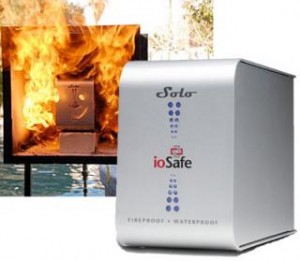
ioSafe Solo External Hard Drive

One of the recurring stories we heard after Hurricane Ike involved loss of data. Computers and external storage devices that were destroyed as a result of flooding. In an ideal world we’d all back up our data twice and keep a copy with us and store another copy off-site for insurance. But even that doesn’t give you any guarantees in a city wide catastrophe that could conceivably wipe our your primary AND your secondary backup locations.

We all have to come to our own decisions when it comes to protecting our data. Many of us tend to be rather lax about making backups and when we do, we only make the one copy. And for those situations it might be worth considering the ioSafe Fireproof Waterproof Solo External Hard Drive.

Guaranteed to be Fireproof to 1550° F for ½ hour
Guaranteed to be Waterproof to 10 feet of fresh water or salt water for 3 full days

The drive comes with a 3 Year Warranty and a $1,000 Data Recovery Service in the event that the company cannot retrieve your data in the event of a disaster.

The ioSafe is not an inexpensive, lightweight desktop external storage device, it’s a hefty data protection system weighing in at 15 lbs and costing from $199 for the 500 gigabyte model all the way up to $449 for the two terabyte version. And there are additional fees for additional warranty coverage

This thing is a black box for your data. Your house may burn to the ground or be submerged under several feet of water, but you will have some peace of mind knowing your data has been given a fighting chance.

You can learn more by clicking here.

2010
04.29

Podcast for April 28th, 2010

2010
04.28

BarretTime for April 28, 2010

The one certainty of life along the Gulf Coast is that it’s going to be hot this summer. And things start heating up next week with a sizzling sale at Directron’s Bi-Annual Customer Appreciation Day. Directron is a national e-tailer with a storefront here in Houston. In addition to a giving you a free sub and cold drink to keep the temperatures of May at bay, they are bringing out representatives from several tech companies to field questions from the public.

AMD, Asus, Cooler Master, Evercool, Gigabyte, Intel, Microsoft, MSI and SuperMicro to name a few. Not that I would want to incite any friction at this kind of event, but it would definitely be fun to bus in some Linux evangelists to hand out leaflets outside the festivities. Are you listening, LUGs?

All of this goes down on Thursday, May 6th, from 10:00 AM to 3:00 PM at Directron on Harwin Drive.

If you subscribe to the old addage of ‘Where there’s smoke, there’s fire’, then things are heating up over at Apple, too. Let’s ignore the fact that police have executed a possibly illegal search warrant at the home of the journalist who accepted the infamous ‘found iPhone’ from a California college student and go straight to a smokin’ hot new app hitting iPhones around the nation.

So…Apple has approved a game for inclusion into the App Store called “Puff Puff Pass”, a game where up to five players choose a cigarette, a cigar or a pipe, a location (either indoors or out) and a time frame, then puff and pass as many times as they can before the clock runs out. I’d be curious to know exactly when this hit the App Store… It probably wouldn’t be such a big deal if Apple hadn’t previously banned Wi-Fi searching apps, political parody apps, apps that constitute duplicate functionality, third party code translation frameworks, (*cough* Flash *cough*), an LCD buyers guide and a port of Leisure Suit Larry. I’ve still never gotten to play that game and it looks like I never will, at least on the iPhone.

While the water may be a little warm on the Apple side of the pool, the Android half is doing fine. If you’re running Android 2.0 or better, you will soon have yet another web browser to choose from. A pre-alpha build of FireFox is now available for the platform, and though it’s far from optimized, it does bode well for both Android phones and especially the oncoming onslaught of Android powered tablets.

And if we continue to peer through the tablet Looking Glass, we can see things heating up between users of the HP tablet and those of the iPad. Apparently, there’s some contention in the world of tablet users as to which is best, with lines often being drawn along business Use Cases. Apple could potentially wipe the Slate clean with updates allowing the iPad to be more business-y, much like they tried to do with the iPhone in 2008.

I don’t know: trying to blend the world of business with the world of entertainment may not go so well. Of course I would like a single device akin to Captain Picard’s Ready Room briefing tablet to use at both work and home, but “Business Up Front, Party in the Back” may only produce the digital equivalent of a mullet. I think that Apple should stick to the home experience while HP carves out a place in the business world. Whatever may transpire in the tablet arena, there’s certainly no end to the flames spewing from both camps.

And here at home, we have five Fridays in the month of April, meaning that we are experiencing a bit of a drought as far as user group get-togethers go. In fact, attendees of our Geek Gathering will have gone a full five weeks since having a chance to level their D&D characters, knit a summer scarf, or lay down dark digital tracks from the DJ booth. DJ table. That’s coming up Friday, May 7th, but for now, that’s it for this puff-puff-passing of my Apple angst and that’s that for BarretTime.

2010
04.22

Podcast For April 21st, 2010

Apple Overload

2010
04.21

BarretTime for April 21st, 2010

Allright. I’m back among the living after my human body hosted a pretty nasty virus for the better part of a week. If I had had some sort of robotic telepresence in the studio last Wednesday, I would have informed you that the first National Robotics Week took place April 10th through the 18th. There were a number of events across the country, with a notable robotics meetup in Dallas along with a number of Robot Block Parties across the nation. The goal of Robotics week is to raise awareness about how robotics technology impacts society and to inspire students of all ages to pursue careers in robotics and other science, technology, engineering and math-related fields. www.nationalroboticsweek.org for a redux on the 10th through the 18th or to look ahead to the second National Robotics Week, taking place in 2011.

And to get you started off on the right foot, tread, track, or whatever your current means of motility may be, the HAL-PC Robotics SIG is meeting this Saturday, April 24th, at one in the afternoon at the HAL-PC headquarters. 4543 Post Oak Place Drive is where you’ll want to be to start building your robot army.

In addition to helping Houstonians welcome our new robotic overlords, HAL-PC offers a vast support network for pretty much whichever area of personal computing that interests you. And if things like Ubuntu, Slackware, Debian, Mint, or even the very word ‘distro’ excite you, then you’ll want to be at the second of two monthly meetings of the Houston Linux Users Group, aka the Linux SIG. The group meets this Saturday at two in the afternoon at the same location as the Robotics SIG. Just follow the fleeing humans upstream to SIG Room C.

For a complete listing of Special Interest Group activities, surf to www.hal-pc.org.

On a side note, the long awaited first beta of Red Hat Enterprise Linux 6 was made available for download earlier today. The Enterprise Linux 6 Beta aims to blur the lines between virtual, physical and cloud computing in order to address the shifts taking place in the modern IT environment. Available for the Intel 386, AMD and Intel 64 bit processors, the System z and IBMs Power platforms, ISO’s are available at www.redhat.com/rhel/beta.

Remember, Linux is a great alternative to getting mired down in the ever contentious Mac vs PC war. And if you’re feeling uber enough to shun Linux, there’s always the BSDs: derivatives of the Berkeley Software Distribution derivative of Unix, of which FreeBSD, NetBSD and OpenBSD are kings. Really, the only way to win a discussion about which Operating System is the best is not to get into a discussion about which Operating System is best in the first place.

On the North side of town, Alex Dumestre will be giving a two hour presentation on the use of PaintShop Pro X3, including its Organization and Express Lab capabilities. He’ll also touch on creating slide shows using ProShow Gold, getting the finished product on DVD, Blu-Ray or even the Web. The presentation wraps up with a finished slide show of a trip down an Eastern European river. All of this takes place under the umbrella of the 1960 PC Users Group this Thursday from seven to nine PM. Hit www.1960pcug.org for details and directions.

And tomorrow is Earth Day. This one is special not only because the Earth is still currently controlled by humans, but because tomorrow marks the 40th anniversary of the Holiday. To honor this occasion, the Contractor Recycling Partnership has organized the second annual Electronics Waste (or E-waste) collection event to be held on April 24 at Space Center Houston. The event is free and open to the public from 8 a.m. to noon. TVs and white goods (such as washing machines, microwaves and dryers) will not be permitted at this event, but all other computer-related electronics will be accepted. I would assume that they’ll be recycling the non-fleshy bits of cyborgs, too, so if you’ve got some parts from the old Cyberdine T-850 Series that you can’t seem to melt down, this is your chance to get rid of them. That’s right – let the good folks at the Johnson Space Center drain the last bit of life out of those glowing red eyes for you… No muss, no fuss.

That’s it for this week’s robo-rendezvous and that’s that for BarretTime.

2010
04.15

Podcast For April 14th, 2010

Barett Canon and phliKtid were out sick and could not make the show. Conversations included Apple fanboi-ism and iPhone jailbreaking.

2010
04.15

iPhone Jailbreaking, You’d Better Be Careful!

On last night’s show we had a number of people calling in about jailbreaking the iPhone.

From About.com

In essence, jailbreaking your iPhone means freeing it from the limitations imposed on it by AT&T and Apple. You install a software application on your computer, and then transfer it to your iPhone, where it “breaks open” the iPhone’s file system to allow you to modify it.

Something we want to make abundantly clear is that taking action to jailbreak your iPhone can have dire consequences. Not only could it damage or destroy your iPhone if done incorrectly, it can also void your warranty. You should also know that there are abundant scams on the Internet that specifically target those who might want to explore the jailbreaking option.

One of our callers mentioned a web site that will provide you with the code to do this for a fee. We responded to the caller that you have no real assurance that the code provided isn’t malicious. To make our point for us, MacDailyNews published this article today called The Microsoft Tax: DNS Windows PC Trojan poses as iPhone unlock utility; Mac and iPhone unaffected

An application that offers to unlock iPhones is actually designed to hijack Internet connections on compromised Windows PCs, security watchers warn,” John Leyden reports for The Register.

While this malicious code only seems to affect Windows computers, who’s to say what the modification to the iPhone REALLY are in ANY of these applications? If you’re going to let someone you don’t know make modifications that could potentially destroy your device or compromise your personal data you are simply playing with fire.

At Technology Bytes we’re fully aware that users of technology like to tinker and we’re neither anti nor pro jailbreak. We just want our listeners to have all the facts.

2010
04.08

Podcast for April 7th, 2010

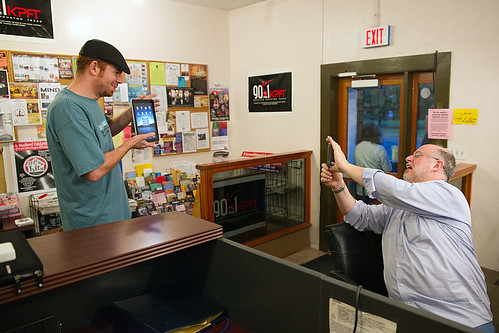
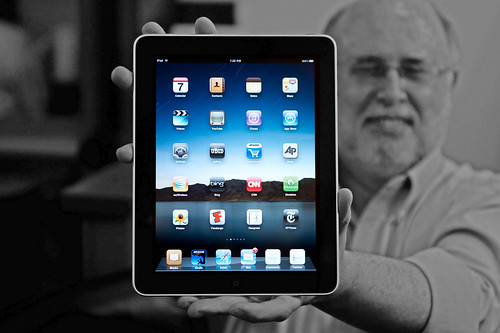
Tonight’s show featured a very special guest in the studio. The Apple iPad. Everyone was very excited!

Barrett Poses With The iPad

I Haza iPad

Goofy Groovehouse

Giddy

Eye Pad

2010
04.07

BarretTime for April 7, 2010

Spring has sprung and new life abounds. Unfortunately, not all of this new life is cute and cuddly. While the bunnies hopping along the bayou are harmless enough, the dust bunnies that grow inside your desktop computer can insulate electrical components and disrupt airflow within the case, significantly increasing the operating temperature of your system.

(I guess that would rank dust bunnies somewhere between actual bunnies and those of the Monty Python persuasion, which await you all with nasty, big, pointy teeth. The thing to remember is this: Keep clear of any cave entrances guarding sacred treasures, and the killer bunnies will keep clear of you.)

So, leaving the cave for the computer: electronic circuitry works most reliably at low temperatures. Higher temperatures can degrade and wear out any heat sensitive materials used in the electronic components, and fluctuations in temperature will stress many more components, causing them to expand and contract, wreaking havoc on the myriad of interconnects found on every circuit board in your PC.

Even more nefarious is something known as ‘metal migration’. This is especially prevalent in areas where high temperatures are combined with high humidity. I personally don’t know any place like that, do you, Houston?

Metal migration occurs when metal whiskers or dendrites grow from the conducting lines of a circuit board. With lines being spaced closer together in today’s devices, shorts between lines can occur, causing component failure and the untimely demise of your PC.

While there’s no immediate cure for metal migration, you can combat dust bunnies with some carefully aimed bursts from a can of compressed air. Don’t make the mistake of blowing any visible dust on external fans inside the case; you’ll need to muster up the courage to open your computer’s case for this job.

Before you crack your desktop’s case, you’ll first want to unplug everything, paying close attention to what went where. Opening your computer case can require anything from the simple press a tab to performing a certain series of knocks and bumps that would just as soon grant you passage to Diagon Alley as it would open your case. When in doubt, get online and search for the instructions on opening the case to your particular model of PC. Trust me: three minutes of Googling is roughly equivalent to ten minutes spent super-gluing broken bezels and tabs back into place…

Be careful not to unseat anything or tug on any wires that would loosen something. Actually, this is a good time to take a look inside your computer and try to identify all the major parts. Again, a quick search for ‘schematic’ and the model of your PC should turn up what you’re looking for. Of course, you don’t want to do this from the computer you’ve got opened up. If you don’t have a second computer around, print them out for handy reference before open the PC.

If you have pets or smokers in close proximity to the PC, you may even want to take the PC outside for this, as smoke and pet hair act like dust bunny steroids. Who knows, you may have a bunny who can bat .400 in there…

Aside from removing any obvious animal life from the PC, you’ll want to make sure that both the fan over your PC’s processor and it’s power supply are clean. If the situation is really bad, you can brush debris off the fan blades, away from the processor or power supply. After that, you’ll want to blow them out with your can of compressed air. Since it’s possible to damage your fan by spinning the blades too quickly as you apply the compressed air, keep them in place with the end of a plastic disposable pen, cotton swab, or something similarly non-conductive.

Blow off any exposed circuit boards, taking care not to get too close to the boards with the air, as pressurized air has been known to dislodge shoddily affixed chips and components. If there are any coffee or soda stains in the base of your PC, first, count yourself very lucky that you still have a running PC, and second, get a slightly damp cloth to scrub them away.

You can also inspect components to make sure that everything is properly seated, or plugged in securely where its supposed to be plugged in. The schematic for your PC will help out with this. If you do need to physically touch any components inside the PC, make sure to touch something metal on the case first, to discharge any static electricity that may have built up on your person. Once everything has been dusted and it looks like a new PC on the inside again, its time to put everything back together and power it up.

If something came loose during your dusting, an error message will generally display on the BIOS screen or you may hear a series of beeps before its even able to get that far. Opening your case again and checking to make sure that everything is properly seated will generally fix the issue.

And if that doesn’t do it, you can just call it quits and head to Austin this weekend for Texas Linux Fest 2010. Happening this Saturday, April 10th, at the Marchesa Hall and Theater, the Texas Linux Fest is a one day event bringing Linux visionaries and gurus together with Linux enthusiasts from across the state of Texas and beyond. Jon “maddog” Hall will be on hand throughout the con, as will a number of notable guests, speaking on things like monitoring large scale Linux systems with OpenNMS, the Drizzle Database, Security Enhanced Linux for Mere Mortals, Ubuntu on the Arm processor and even a talk on Unicode. If you’re on Mac or Linux and you’ve ever noticed the
diamond-question-marks in place of oddly accented characters, this talk is for you.

I’ll be in attendance, so be sure to say ‘Hi’ if you head that way. Hit
www.texaslinuxfest.org
for a schedule of panels, directions to the venue and details on registration (which they have made extremely reasonable for those who may be on an open source software style budget).

That’s it for this dust-bunny death-match and that’s that for BarretTime.
2010
04.06

Will The iPad Blend?

The good folks at Blendtec wasted no time answering the question that is at the top of the list of those considering purchasing the new Apple iPad…