2010
02.25

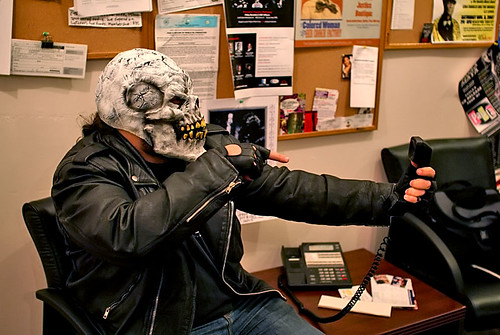
J.R. Cohen in the KPFT Studios

Even though this was a fundrasing episode, we didn’t have to do any fundraising as we met our $1,500 goal prior to airtime. This was due to a generous matching pledge by a listener named Ian and the efforts of our fans via Twitter and Facebook.

2010
02.24

Thank you for calling KPFT

During the KPFT pledge drives, Technology Bytes is responsible for raising a certain amount of money toward the overall station goal. This usually equates to about $1,500 during each show we broadcast during the drive.

We have always said that once we make our goal for any given episode we’ll stop begging for money and just do a regular broadcast.

If you are a regular listener of Technology Bytes you may recall that during the last KPFT pledge drive, we raised our $1500 goal in the first 45 minutes. This was unprecedented, and obviously very exciting for everyone involved. It also meant that we had a one hour and fifteen minute oasis of non-fundraising programming in the middle of the KPFT pledge drive.

Fast forward to the current pledge drive. Last week we met our $1,500 goal, but it took us up to the final minutes of the show to do it. This is pretty common. In looking ahead to the second fundraising episode we pretty much expected the same thing. That is, until we got the following e-mail:

I would like to make a significant donation to your show. I notice that
sometimes large on-air donations are followed by fallow periods. I wonder
how best to maximize my contribution. I’m thinking that a matching
contribution until the show’s record completion time (45 mins?) might work
well. So I would contribute $750 in the record breaking scenario, and less
otherwise. What do you think?

E-mail were exchanged to validate the claim and we’re pretty confident that this is a legitimate offer.

So basically, this listener will match up to $750 in pledges that come in under the 44 minute mark to help us meet our $1,500 goal AND break the record.

That means if we raise $750 in under 44 minutes we’re done for this fundraiser. And it doesn’t have to go down to the wire, either. If we raise $750 in the first 10 minutes, we’re done.

OOOH! Here’s a thought. Let’s take this one step further!!! If you call 713-526-5738 RIGHT NOW and make your pledge and specifically state that it is for Technology Bytes, we might make our goal before the show even begins. But you have to make sure the volunteer that answers the phone knows you are pledging for Technology Bytes and not for the current show so the amount will be credited to our show.

Another option, make an online donation!


Make your pledge NOW and donate whatever you can. We can do this and we can do this quick.

2010
02.21

We get a lot of e-mail and phone calls from people who are buying new computers with Windows 7 and the most common question we’re asked is “How do I transfer my files and data from the old compute to the new one?”

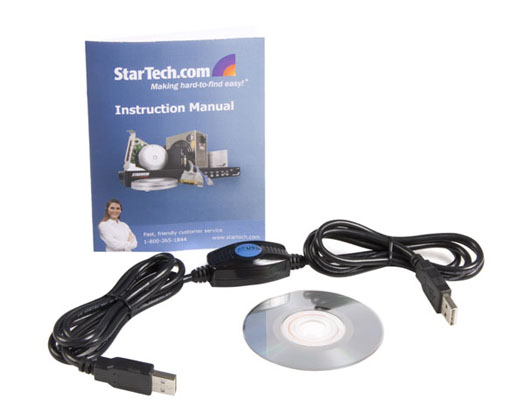
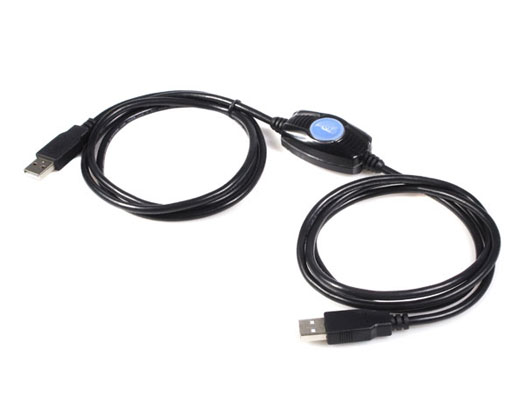
If you are not connected to a network or you find setting file sharing and so forth just a little too intimidating, Startech has an easy to use and very affordable option called the USB Easy Transfer Cable.

Simply connect one computer to the other using your USB ports and transfer files easily from one computer to the other at speeds up to 480Mbps.

2010
02.17

Allright.

We’ve got one lone event on the radar this weekend… This Saturday, February 20th, Bob, “Dr. Mac” Levitus, will be giving his State of the Mac Address to the attendees of the February Houston Area Apple Users Group. Special Interest Group meetings kick off at nine am, Dr. Mac’s address happens around eleven, and things are wrapped by two. Hit www.haaug.org to get SIG details and driving directions to the Bellaire Civic Center, located at 7008 South Rice Avenue in Bellaire, Texas.

I’m curious if Dr. Mac actually gives his talks wearing blue scrubs over what I can only assume is a black Genius t-shirt and a stetho-mouse: half-mouse, half-stethoscope. I assume that he uses the device to deduce whether you are, at heart, a Mac or a PC. If the pic on haaug.org *was* PhotoShopped, I don’t want to know. I’d prefer to live in a world where the stetho-mouse exists, even if that world is completely out of touch with reality. Like the one Google just moved to.

In all fairness, I think that everyone enjoys the occasional break from reality. It’s why people still watch Star Wars Episode IV: A New Hope. It’s probably why Lucas made episodes one through three. It’s also probably why a lot of you partake in the immersive and often complex worlds created by Massively Multiplayer Online Role Playing Games. Things like World of Warcraft, City of Heroes, EVE Online and arguably Second Life. The problem with a few of these pass times is that the in-game rewards are often based on time spent playing the game. This usually takes the form of hunting around for money or doing various repetitive things to gain those precious experience points. Of course, real life money can always be converted into virtual riches, even if you have to go through some fairly shady sources to do so.

Tonight’s big announcement is that Technology Bytes has its own MMO-RPG that lets you compete with other players to earn real-world
rewards. The game is so completely immersive that, for many, it is indistinguishable from the real world. To play, you simply surf
to www.geekradio.com. That’s it.

While you may not realize it, you are now playing Technology Bytes Farm Town. To start the game, you simply go around the house looking for loose copper and silver coins. That’s right, your first job is a copper farmer. As a level one noob, you’ll want to start by farming your immediate area. Your own pockets, under the cushion your sitting on, and so forth. Once you have a feel for the game play, you can widen your search to other rooms and immediately outside your home. Be careful when farming in the street, though, as Tech Bytes Farm Town doesn’t let you respawn. Once you’re out, you’re out. Which is probably why we should get a Tech Bytes Farm Town Last Will and Testament up on the site. (I’ll get with the developers…)

When you’re ready to begin questing, you may search friend’s houses, the coin return slots of pay phones (if you can still find them) and vending machines located in public areas. When you’ve amassed a total of $40.00 in change, head back to where you launched the game, and click on the Donate button on the left of the game UI. Once you have submitted your Tech Bytes Farm Town Copper, you will be rewarded with the title of “Member” in the Guild of Listener Supported Radio.

Now, I’m not a fan of running in-game cheats or hacks, but there is a way you can control more than one virtual player or avatar at a time. In games like World of Warcraft, this is known as multi-boxing. To do so in Tech Bytes Farm Town, simply open a new browser window, get it side-by-side with the existing geekradio.com window, and surf to www.technologybytes.com. Now you’re multi-boxing; now you’re elite.

Of course, you can always just skip all the farming & questing and just donate real life money without the need to go through any shady sources to do so. And if you choose to pledge during a guild meeting night, like right now, you can submit your gold through our in-game voice chat system. It’s a little like Ventrillo and it’s called the telephone. Just pick it up and dial 713.526.4000 to get online with one of our game operators now.

Well, that over half of that for our own pledge farming quest, and that’s it for BarretTime.

2010
02.11
2010
02.10

Allright. I’m back in full swing, with all the appropriate keyboard mappings in place. Last week’s blunder was actually a brilliant segue into what has become known as the Collins Incident in several college communications classes.

When Waco’s K X X V’s regular TV sportscaster became ill, college freshman Brian Collins agreed to step in. All you have to do is read the lines, right? Not too tough… Unless you happen to have been working with an inexperienced teleprompter operator who accidentally fast-forwarded through each of the scripts, leaving Collins with only a few occasional words to use. The video can be found on YouTube, and is fairly painful to watch. When you *do* get to that magical meme, Boom Goes the Dynamite, you will have suffered sufficiently to knowingly command the phrase yourself. Don’t cheat. Feel the pain. It’s the kind of awkward pain that probably made The Office such a hit…

Now that the president has delivered a teleprompter-error-free State of the Union Address and Jobs, who also achieved elocutionary excellence, has dropped the iPad on the nation, it’s time for our own local State of the Mac address to be given by Bob “Dr. Mac” Levitus at the general meeting of the Houston Area Apple Users Group next Saturday, February 20th. That gives you a full week & a half to make peace with whatever feelings you may have about the Apple iPad before Dr. Mac puts his finger in the wound once again.

I’m not letting my own personal feelings show, am I?

A number of Special Interest Group meetings take place between nine and two, with the main presentation kicking off at eleven. 7008 South Rice Avenue at the Bellaire Civic Center is where you want to be to hear what Dr. Mac has to say about everything Apple. Hit www.haaug.org for details and directions to February’s general meeting and to catch up on the group’s activities.

And if you find yourself on the PC side of the fence… Amend that. If you find yourself on the *North Side* of the PC fence, then you may want to check out the 1960 PC Users Group. That’s Farm to Market 1960, not a group of people still stuck on the Intel 4004 processor. They’re a support group of volunteers from the Spring, Tomball and Northwest Houston areas of Texas with an interest in personal computers and their usage.

And as luck would have it, their Investors Special Interest Group is meeting tomorrow night, Thursday February 11th, from seven to nine PM. This month’s special topics include Preferred Dividend Stocks and Exchange Traded Funds. There will be an open discussion during the meeting, at which point you could pose questions about modifying your investment strategy to siphon off a few dollars every month for KPFT.

I’m guessing that they would probably tell you that you’d be hard pressed to find a return similar to the one you would realize by investing in KPFT at any one of our various membership levels. Now, I haven’t looked at a prospectus in ages, but I’m pretty sure none of the Fortune 500s are offering coffee cups and t-shirts along with welcome letters. You’ll also get better voting rights with KPFT. One share out of 906 million won’t sway any elections at Apple, but a single membership in KPFT has the same voting weight as our very own Jay Lee’s membership.

Once you’ve devised your new investment strategy, you may wish to display it graphically. A personal investment pie chart, with a big slice for KPFT may be the way to go, but you’ll want to spruce it up a bit with some text overlays. If that’s the case, then next Thursday’s Graphics SIG may be for you. In addition to following up on some questions as to ‘how best to overlay text onto a photo’, the group will be discussing some non-photographic uses of graphics editors, as well as taking a quick look at the photo organizing program, Picassa.

Both of these meetings take place at the Cypress Creek Christian Community Center, located at 6823 Cypresswood Drive in Spring, Texas. The group’s website is www.1960pcug.org, where you can find a full calendar of the group’s monthly SIG meetings.

And finally, if you’re not on either side of the PC vs Mac fence, but are instead frustrated by the lack of a third option, then the Houston Linux Users Group, aka the HAL-PC Linux SIG, is where you will find like-minded individuals and a quality presentation over something Linuxy. The group meets this Saturday from two to four in the afternoon at the HAL-PC Headquarters, located ever so close to MicroCenter at 610 and San Felipe. Hit www.hal-pc.org then surf to their SIG Calendar for further details and directions.

That’s it for forcasting your financial future and that’s that for BarretTime.

2010
02.09

While working on a co-worker’s computer that was infected with spyware I was able to remove just about everything using the tools I outline in Jay Lee’s Patented Spyware Removal System save for one persistent troublemaker that was redirecting every Google search through something called Triplexfeed.

Malwarebytes didn’t detect it. Spybot didn’t detect it. Combofix didn’t detect it. I couldn’t even see it as a BHO using HiJackThis. It was simply invisible to me, but each and every Google search popped up a window that clearly showed my Web browsing traffic being redirected.

I did a little research and was able to figure out I had come across a nasty TDL3 rootkit.

From Rootbiez

TDL or TDSS family is a famous trojan variant for its effectiveness and active technical development. It contains two compoments: a kernel-mode rootkit and some user-mode DLLs which performs the trojan operation (downloaders, blocking Avs, etc,.). Since the rootkit acts as an “injector” and protector for the ring3 bot binaries, almost technical evolutions of this threat family focus on rootkit technology so as to evade AV scanners. As in its name, TDL3 is 3rd generation of TDL rootkit, still takes its aims at convering stealthy existences of malicious codes. Beside known features, this threats is exposed with a couple of impressive tricks which help it bypassing personal firewall and staying totally undetected by all AVs and ARKs at the moment.

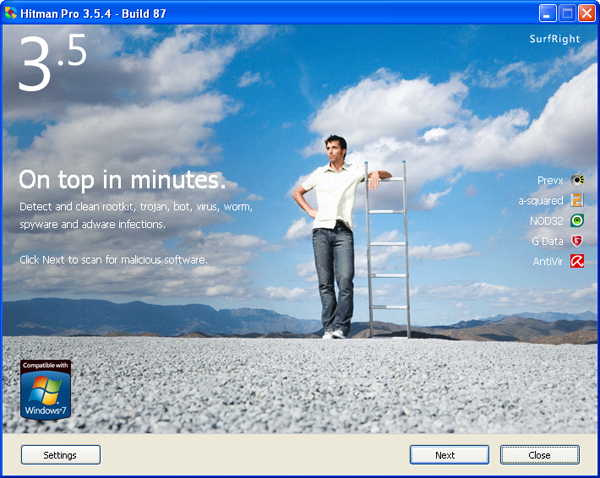
Thanks to Daejin Media I got tipped to a program called Hitman Pro 3 – Second Opinion Malware Scanner.

Hitman Pro 3 scanned the infected system, detected about 5 things and removed them and had me reboot at which point it scanned again and found two more. After the second re-boot the system was free of the hijack.

It doesn’t install anything on your computer, either. Just a single executable that scans your computer and cleans up the mess. Hitman Pro is FAST, too. I had everything cleaned up in about 10 minutes.

Part of the magic of this program is how it uses a scan cloud to determine if suspicious files are, in fact, dangerous or not.

From the Hitman Pro Web site:

For the files that are classified as suspicious, the Hitman Pro client sends a request to the Scan Cloud for confirmation if these files are indeed malicious. The Scan Cloud is a cluster of multiple computers, residing on the Internet. The Scan Cloud will respond to this request with the answer:

* Safe
* Malicious
* Unknown

When the file is unknown, the Hitman Pro client uploads the file to the Scan Cloud where the file is scanned using the anti virus programs of 5 different vendors. Each of these anti virus programs analyzes the file and responds with “safe” or “malicious”. Click here for more details about the Scan Cloud.

Hitman Pro is not free. They do offer a 30 day free trial, though. After that the price is subscription based.

Not since discovering Spybot Search & Destroy have I been THIS enthused about an anti-spyware tool.

2010
02.06

A few photos from the geek gathering. Additional photos in the gallery.

7

Knitted Hat

10

Osciliscope

3

1

5

9

2010
02.04

Technology

You are invited to attend the Technology Bytes monthly gathering/meet-up. We’ll be descending upon at The Coffee Groundz, located 2503 Bagby, in Houston, TX.

The Coffee Groundz offers a diverse menu of coffees, teas, beers, wines and even well drinks and most important of all, FOOD AND FREE WI-FI!!!.

This is an all ages event, so please bring your family and friends and enjoy an evening hanging out with the hosts of Technology Bytes along with many of our friends and fans.

The event starts around 7:30 and goes until ?

You don’t have to be a geek to attend. Heck, you don’t even have to be a current listener of the show. This event is a casual meet-up for anyone interested in technology or social media in all its forms and a great opportunity to just hang out with like minded individuals.

The Geek Gathering has been happening the first Friday of the month since February of 2002 and is always a good time.

There is no need to RSVP, but if you have a Facebook account you can let us know you’re coming at the Facebook Event Page

We hope to see you there!

2010
02.04

Discussing the Apple iPad and mobile computing in the first 1/2 hour. Great conversation. Also went back to original intro and bumper segments.