Jay Lee’s Patented Spyware Removal System
Updated 08-04-2010
From the Microsoft Security Web site
Spyware symptoms
If your computer starts to behave strangely, you might have spyware or other unwanted software installed on your computer.
* I see pop-up advertisements all the time. Some unwanted software will bombard you with pop-up ads that aren’t related to a particular Web site you’re visiting.These ads are often for adult or other Web sites you may find objectionable. If you see pop-up ads as soon as you turn on your computer or when you’re not even browsing the Web, you might have spyware or other unwanted software on your computer.
* My settings have changed and I can’t change them back to the way they were. Some unwanted software can change your home page or search page settings. Even if you adjust these settings, you might find that they revert back every time you restart your computer.
* My Web browser contains additional components that I don’t remember downloading. Spyware and other unwanted software can add toolbars to your Web browser that you don’t want or need. Even if you remove these toolbars, they might return each time you restart your computer.
* My computer seems sluggish. Spyware and other unwanted software are not designed to be efficient. The resources these programs use to track your activities and deliver advertisements can slow down your computer and errors in the software can make your computer crash. If you notice a sudden increase in the number of times a certain program crashes, or if your computer is slower than normal at performing routine tasks, you may have spyware or other unwanted software on your machine.
If any of this sounds familiar, please read on.

First of all, there is no “sure fire†way to explain in a document how to rid yourself of all spyware and browser hijacks. Depending on the level of infestation this process will either eliminate all or, at the very least, most of the problems you might be experiencing as a result of this epidemic. In some cases the infestation is so deep and so pervasive that a skilled technician is required to sit down at the troubled PC and duke it out using all the skills he has to literally rip the infection out and still maintain the functionality of the computer.
The first thing you want are the tools. There are numerous companies offering programs that claim to remove spyware from your computer. Some are legitimate and others are not. Some are free and others are not. The first step will be for you to download and install these program onto the computer you are working with.
The first tool I suggest is Malwarebytes Anti-Malware. Possibly the best spyware removal tool I have found. The company offers a free version for personal use which works without needing to pay for it. But BE CAREFUL!!! When you click on the link to the free trial download the page you go to may have ads on the page for other programs. These ads are usually marked in fine print. DO NOT BE TRICKED INTO DOWNLOADING ANYTHING OTHER THAN MALWAREBYTES ANTI-MALWARE!
When installed and running, Malwarebytes will look like this:
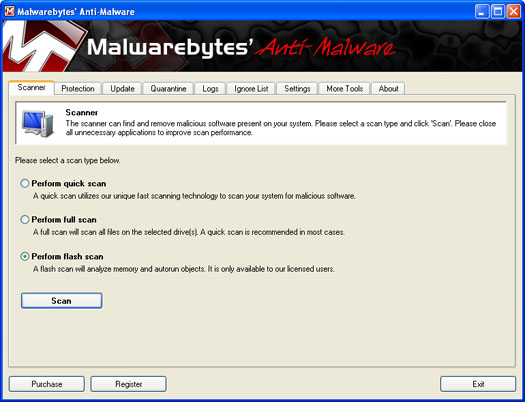
If what you download and install looks different, or is called something other than Malwarebytes, you have downloaded the wrong program. Uninstall it and try again.
The second tool I recommend is called Hitman Pro 3 by SurfRight. This tool is free for 30 days and will remove some very nasty rootkits and other spyware infections. It has found and removed problems that Malwarebyte has missed completely.
When installed and you first run it, the program will look like this.
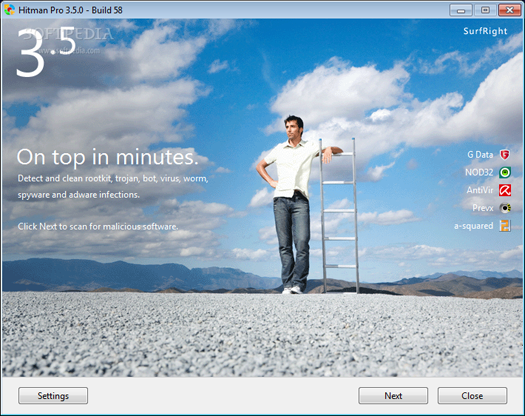
Again, if what you download and install looks different, or is called something other than Hitman Pro, you have downloaded the wrong program. Uninstall it and try again.
With both Malwarebytes and Hitman Pro you will want to make sure and update the programs after you install them to make sure you have the latest versions and the most up-to-date spyware definition files.
The third tool I suggest is Norman TDSS Cleaner. You’ll need to click on the Removal tab to access the download. When up and running it will look like this:
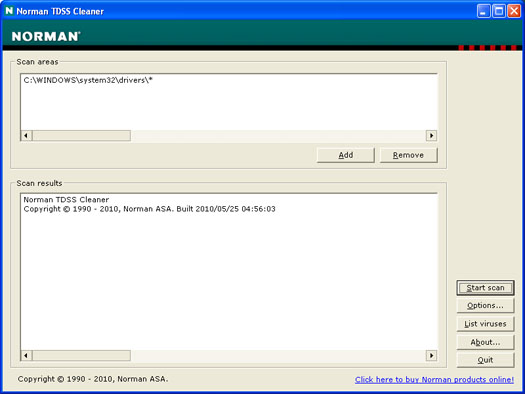
Once you scan your computer with these programs I suggest you let them remove anything they detect. In some cases these programs may request that you reboot your computer to complete the removal. I suggest you let them do this.
At this time I believe these three tools to be the most effective for spyware removal. Keep in mind that some spyware will actually block your ability to run the removal tools. If you encounter this, you may need to download the above tools on another computer and then move them to the infected computer via a thumb or flash drive and install them.
Advanced Removal Tools
For more advanced spyware removal there is a tool called Hijack This. Be careful with this tool. It will show you all the things that load when you start your PC and allow you to remove them. This tools shows the good and the bad and makes NO distinction between the two.
Another tool you might want to have on hand is Combofix. It’s not the most glamorous or slick looking anti-spyware tool around, and it is not the most intuitive. But it has fixed spyware issues that other programs don’t seem to be able to handle. If you can follow simple directions, you might give this one a whirl and see if it takes care of the problem.
If you get really stuck, and cannot get rid of the spyware infection I suggest you have a look BleepingComputer.com, a free community where computer users come together to discuss and learn how to use their computers in an atmosphere that is both helpful and welcoming. With over 160,000 registered members asking and answering questions, BleepingComputer.com has become a vibrant and lively community of like-minded people. BleepingComputer is paid for completely by advertisement revenue and the staff are all volunteers. What this means is that any support and advice you receive from this site is completely free.
These guys are a great resource and may be able to help you out of a jam.
July 15th, 2006 at 1:19 am
have you had any luck with ewido anti-spyware that is at the AVG download site. It seems to protect automaticly and is doing a better job than the beta microsoft program that missed a spy that required a complete drive format. I feel immune with the AVG setup, try it, its gratis.
July 15th, 2006 at 5:36 pm
Ewido is an EXCELLENT program. I need to use it more to see just how capable it is.
August 5th, 2006 at 5:48 pm
Hi Jay,
Thanks for the info regarding spyware. It is very helpful.
I am currently running both Spybot as well as Spyware Doctor . . . . is that not duplicitous? Should I drop one of those and ad Adaware?
Also, what can you tell me about anti-virus software?
My Norton Anti-Virus just expired. I’ve been told to change to McAfee by some because of the problems caused by Norton.
Others advise me to get a product by CNET, the name of which I have forgotten.
I am really confused. I need help with this issue, because I do not want to be ‘unprotected’ for very long!
Your input would be really appreciated.
Thank You,
arie
August 6th, 2006 at 4:00 am
I have yet to find one anti-spyware program that detects and removes em all. That’s why I have the three listed in my outline.
As to anti-virus, check out AVG from http://free.grisoft.com
August 14th, 2006 at 8:44 pm
What’s the difference between Windows Defender and Windows Malicious Software Removal Tool? Do we need both?
August 15th, 2006 at 2:05 am
It doesn’t hurt to have both.
August 22nd, 2006 at 8:31 pm
I’d like to suggest the use of SpywareBlaster
from
http://www.javacoolsoftware.com/spywareblaster.html
I’ve been using this for years and rarely have
any spyware problems.
August 22nd, 2006 at 11:25 pm
II want to download Spybot Search and Destroy, but am not familiar with what the website is asking regarding a “mirror”. Four options are given. Two of which I know are not appropriate. The other two are:
BN FileForum
PlanetMirror W
hat is a “mirror”? and Which “mirror” should I choose?
Thanks.
August 23rd, 2006 at 3:31 am
A mirror is an additioinal website that offers a download of the software. Because it is linked from the original site, you know that you can trust what you are downloading. Essentially, the mirror allows other websites to share the load of people wanting to download software. It can be bandwidth and server intensive.
You can choose whatever mirror is closer to you (usually as long as it is in the same country as you it doesn’t matter).
Does that answer your questions?
Peter
August 23rd, 2006 at 2:17 pm
Yes! Thank you.
September 20th, 2006 at 2:23 pm
I have been playing with EWIDO, here at work, for about two months. There are two versions, an free online scanner and the downloadable 30-day trial version.
I have included EWIDO in my battery of anti-spyware tools because it does something MS Defender and Ad-Aware does not do, it scans the files used by Mozilla’s Firefox. Normally I use the online scanner and save the trial version to erradicate the tough little critters in safe mode.
October 3rd, 2006 at 10:28 am
We remove Spyware and all malware infections daily in our shop.
Someof the tricks we learned in removing any Malmare is,
#1. Update all your Malware Removal Tools (Anti-Spyware-Anti-Virus)
#2. Open all your hidden files
#.3 Shut off System restore (Malware can now hide in system restore on the disk)
Opening all hidden files allow your malware removal tools to scan hidden files, including System Restore Partition.
#4. Set your Hard Drive or drives to “Slave Drive” Settings (unplug your CD Player)
#5. Ready…Run the your Removal tools 2 times.
#. 6 If the system needs Tmp files and defraging
do this at the time your finished in safemode cleansing
your system.
7. now boot up, run all Microsoft Updates, Security Patches…
Have your MS updates Set to auto. down load the Upgraded Version of Internet Explorer 7.0 it is now almost a copy cat of Firefox (Which Microsoft Called Out for Help from Fire Fox)
We have had great luck with “Spydetector” and Ewido…
Plus for Anti-Virus we have been beta testing “Solo Anti-Virus” and Using of course AVG…and now beta testing AVAST.(Avast is more for 64 bit-like in Windows VISTA)
Sheehan O’Brien MCSE-CNA
Compu-Tek of Tampa Bay
http://www.slowcomputeronline.com
April 22nd, 2007 at 11:52 am
I was having a nervous breakdown yesterday because of my computer problem. Found your column of January 04, 2007 got on http://www.atribune.org, downloaded VundoFix; completely corrected everything. ( I had found other “fixes’ previously that would temporarily alleviate the problem but it would immediately return. ) This one really fixed it.
Thank You so much.
April 26th, 2007 at 4:47 pm
I have read your articles on spyware, spybot,etc, and they all cost money.Is there any free spyware programs?
Hutch
May 7th, 2007 at 8:31 am
Leonard, I don’t understand your problem…
AdAware, SpyBot Search and Destroy, and Windows Defender are the spyware tools Jay recommends, and they are all free.
AVG is the anti-virus, and it’s free.
I would personally add that everyone should be running a firewall. The one built in to XP is not good enough, IMHO.
I would suggest the free version of ZoneAlarm.
What might be confusing you, Leonard, is that the companies that make these programs usually have an advanced version that you have to buy.
Some sites can make it hard to find the free version, because they want you to buy the ‘full’ version. Just keep navigating, you’ll find the gold eventually!
June 21st, 2007 at 6:03 pm
really enjoy your chronicle column every tuesday. thanks.
August 9th, 2007 at 12:47 pm
Do you have an opinion on ESET’s NOD32? Is it comprehensive enough?Thanks. Bill
August 24th, 2007 at 12:06 pm
No personal experiece with this product…
But you might want to read the review from PC World
NOD32 has the best proactive protection by far, but its overall malware detection is second-tier, and it has an overly technical interface.
Read more…
July 21st, 2008 at 10:53 am
NOD32 is GREAT! When I was researching which new Anti-Virus to get (because Mcafee turned to crap-ware) I settled on NOD32. It was a dead-tie between Kaspersky Anti-Virus and NOD32. They both caught everything that was thrown at them in all the tests I could find, but NOD32 has a MUCH smaller foot print and is super light on the computers resources. (IMO Kaspersky is a little pricey too.) I think there has been an update pretty much everyday since I installed aswell. True NOD32 may not have an “Idiot-Proof” interface catering to the non-tech saavy, but I personally prefer it that way. Functionallity – Frills = Happy Coumputer Guy! As far as I know NOD32 does strictly Viruses though not spyware. In my experiences, a program that tries to do both, ends up doing niether very well(McAfee,Norton). Smart surfing will go a long, LONG way. I usually use a battery of spyware removal tools, most of which have been listed or mentioned here to clean off spyware (usually off of friends computers). Just my two cents though.
PS If memory serves, VundoFix specifically removes variants of the VirtuMundo virus. I did battle with that thing last year on a couple different boxes and it is a BEAAST! As far as I could tell VirtuMundo actively goes out and downloads more spyware onto systems (and who knows what else). None of the scanners could kill it and only two of them even Identified it…Found a couple different custom fixes (like the VundoFix listed above) and they ended up finally doing it in. Granted that was a while ago so the situation may have changed in regards to the scanner situation since then.
December 10th, 2008 at 8:32 am
[…] Protecting Your Privacy With Download Spyware Adware Removal Programs | IT Support Salford – Computer Support Services in SalfordFree Spyware RemovalAdware, Spyware Removal – Security Practices to Eliminate Infections | New Consulting TipsRemove Trojan.Zlob.G at CGI Doctor – spyware removal helpInformation on Adware and Spyware Removal | Dashboard Templates ~Web DesignQuestAntiSpyware.com » Blog Archive » Important Information : A Guide to Spyware Adware Removal Jay Lee’s Patented Spyware Removal System | […]
August 19th, 2010 at 4:00 pm
Thank’s I’ve had great luck with malwarebytes. The symptoms are that the computer can’t connect to the internet and they get pop ups to sites like porno.com and adult.com, but they can’t connect.